Extensions Shop Admin · Operate
One admin that knows the whole shop.
The Shop Admin is built into every shop we build: orders, products, customers, discounts, emails, campaigns, backups. From Shop Pro it becomes an inventory management system with stock, purchase prices, goods receipt, point of sale and general ledger. All in one interface, on your account.
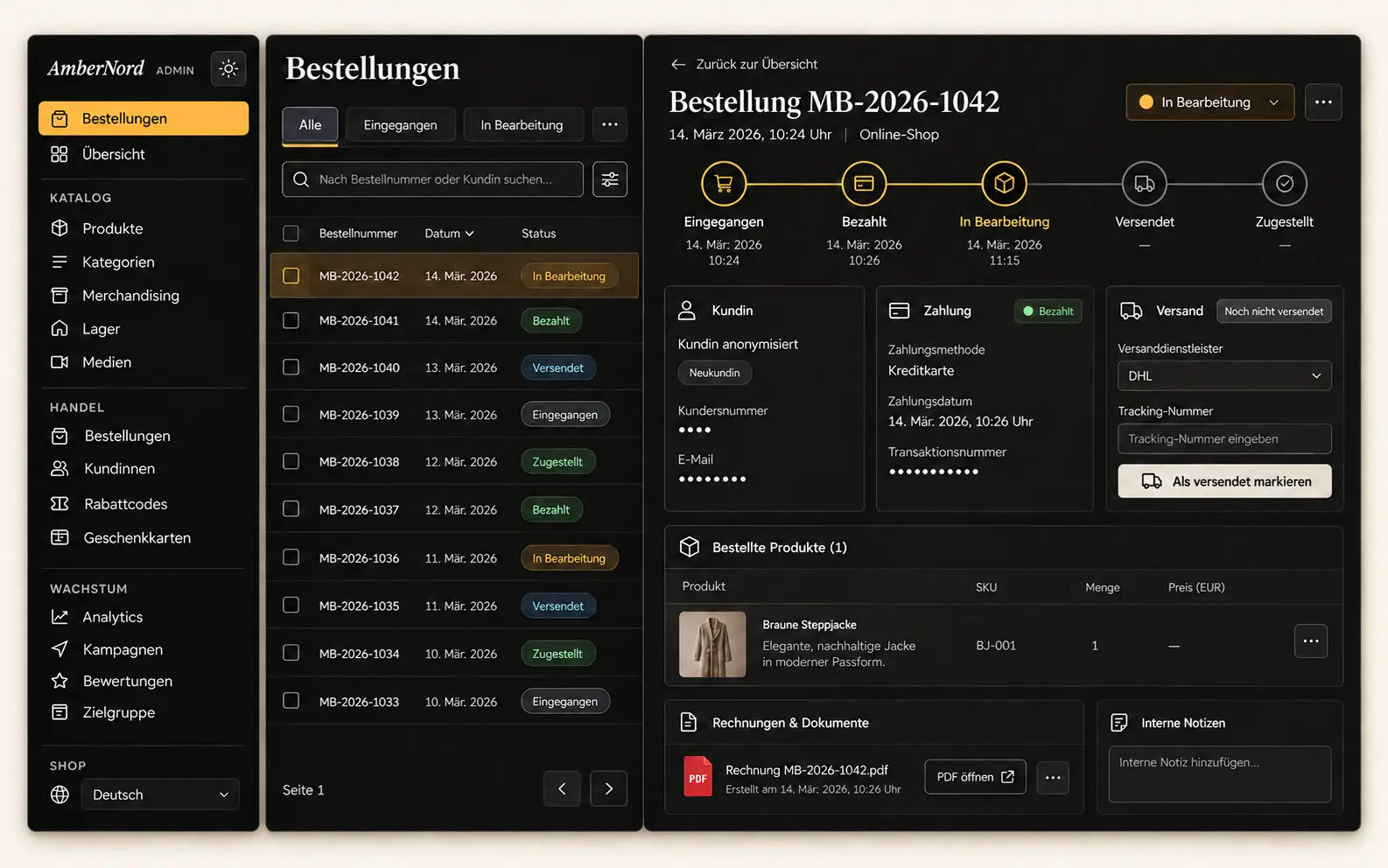
- Included in every shop
- Inventory management from Shop Pro
- Invoices as PDF from the admin
- Runs on your account
Who we built the Shop Admin for
For shops that want products, orders and content in one place – across several languages when needed.
The shop that works with spreadsheets today
Stock list in a spreadsheet, invoices in a word processor, customer list in the mailbox. The Shop Admin turns that into one place: stock per SKU, invoice at the push of a button, customers with history.
The brand with a store and an online shop
Sales in the store with the phone, sales online in the shop, one stock. The point of sale requires a photo of the receipt, so accounting never has to ask.
The business that wants to see its numbers
Revenue by channel, bestsellers, returns, purchasing costs, net shipping, fixed costs, wages. Per month, as a table. Not at year end with the fiduciary, but now.
What the shop admin can do
Eight areas out of twenty-three. The first four are included in every shop, the second four belong to inventory management from Shop Pro.
Orders with payment, invoice and shipping
Payment through the payment provider; card data never touches your system. The invoice as PDF is attached to the confirmation, in up to six languages. Once payment arrives, you create the shipping label with one click.
Products and import with preview
Products with variants, translations and images. Import from CSV or spreadsheet first shows what would change; nothing is written until you confirm. A second import creates no duplicates.
Emails and campaigns
Order confirmation, review request and one post-purchase offer per order, whose text the AI suggests and you approve. Newsletter to subscribers, customers or everyone, with unsubscribe. Cart reminder when someone does not complete checkout.
Customers, discounts and backup
Customer accounts, consents, discount codes, vouchers and loyalty points. The database is backed up daily to your storage and can be downloaded at any time. Five tasks run on their own: backup, price history, cart reminder, shipping status, cleanup.
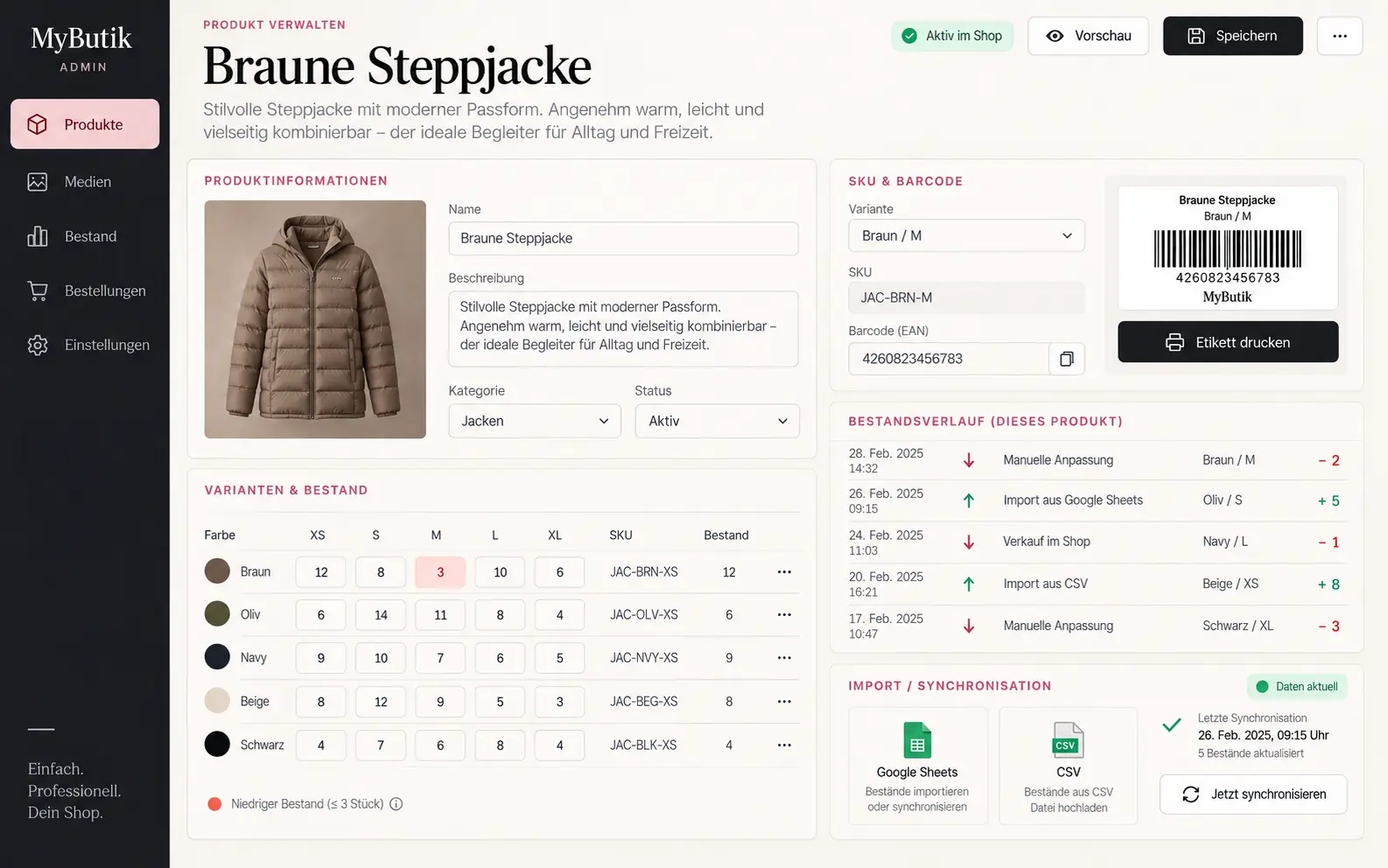
Stock with purchase price per SKU
Every variant has a permanent SKU following a fixed pattern, stock level, purchase and sales price. Warning at low stock. Goods receipt with landed cost and margin, which the admin calculates immediately.
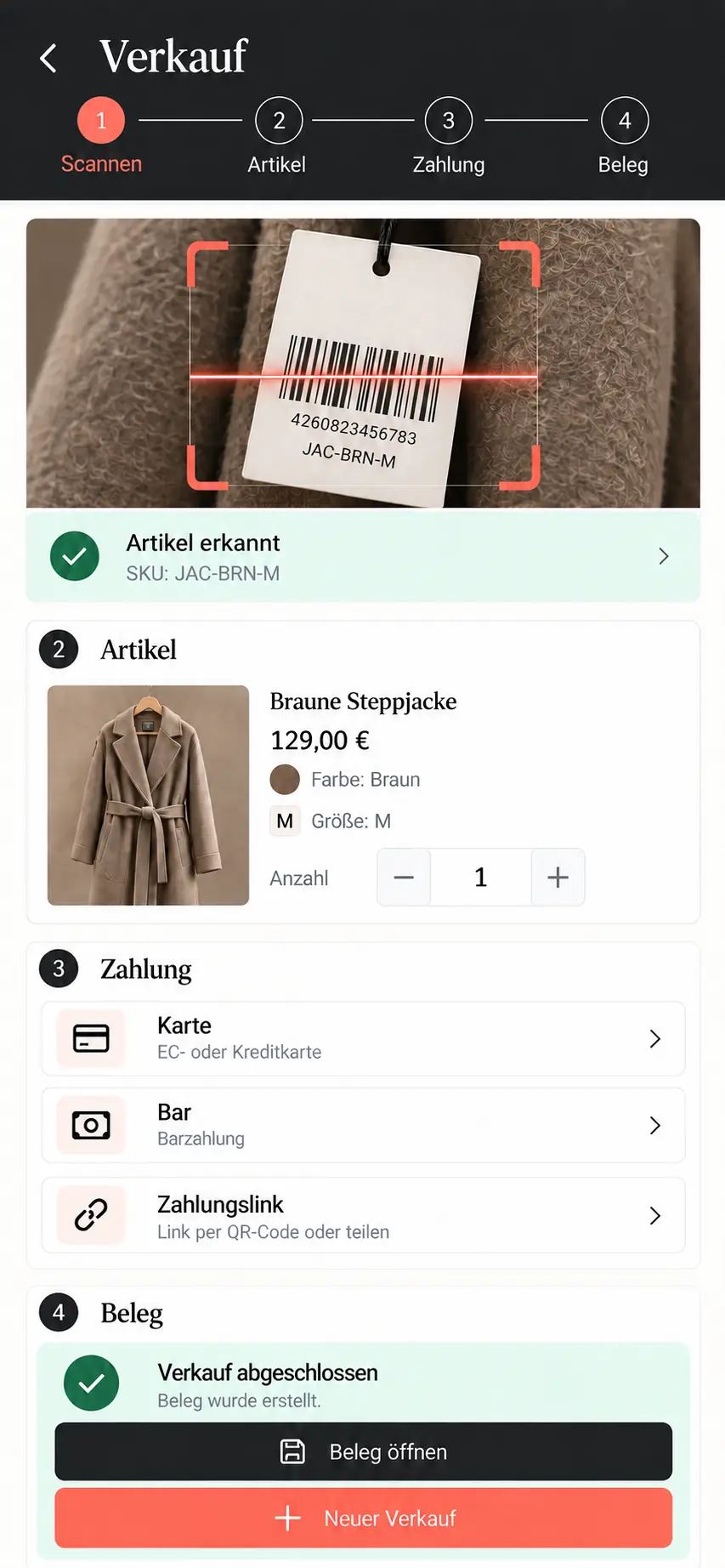
Point of sale and stocktaking on the phone
Sales in the store via the phone, photo of the receipt required. Stocktaking counted by phone, without admin login. Store and online share the same stock and the same booking.
Expenses, wages, general ledger
Fixed costs, wages, depreciation, net shipping. Plus revenue and purchasing costs per month. The general ledger goes to accounting as an Excel file, contacts and orders as CSV.
Price history and lowest price
Every night, the price of every item is recorded. During a promotion, the shop shows the lowest price of the last 30 days, as the price indication rules require. Without anyone having to remember.
How an order runs
Payment arrives
The payment provider reports the payment. Stock is deducted exactly once, even if the notification arrives twice. The invoice is created as PDF.
Label with one click
In the order you click "Prepare shipping". The label comes through the Swiss Post interface, once your Post contract details are stored, and is ready as PDF.
On its way
A run polls the shipment status and sets the order to "delivered" as soon as Swiss Post reports it.
Afterwards
Review request after a few days. A post-purchase offer, when it fits. Returns recorded with reason, stock booked back once.
Under the hood
The Shop Admin runs on your own account at the edge. No rent, no third-party account, and the backup belongs to you.
Stock is booked exactly once
The payment notification is idempotent: if it arrives twice, nothing is deducted twice. A cancellation books back exactly once, and store and online shop use the same booking function.
Deleting needs a reason
Two roles: admin and operator. Whoever deletes an order gives a reason and confirms with their password. Both land in the log.
Invoices speak the customer's language
Invoice PDFs and emails come in the language of the order. Our second shop runs six invoice languages, the Swiss shop four. What your shop needs, we define in the concept.
Card data never touches your system
Payment runs on the payment provider's side. Your admin only receives the signed "paid" notification, and a notification is processed only once. Payment methods such as TWINT you enable with the provider.
Backup to your storage
Every night the database is written to your own storage. You can download it at any time. If you switch to someone else, you take everything with you.
AI where it helps, with approval
Product descriptions, translations, campaign copy, search engine copy and the post-purchase offer are suggested by the AI. What gets published is what you approve.
Build-out for your shop
What we build on for you
Three things are not in the Swiss admin today, and we would rather say so now than at the first invoice. We build them into your project, at a fixed price.
QR invoice
The Swiss QR invoice on every invoice PDF, with reference number, so that payments are matched automatically.
Bexio export
Invoices and contacts in the format Bexio reads directly. Today there is Excel and CSV; the Bexio format is added.
Shipping notification with tracking number
In our second shop the tracking number already goes to the customer automatically. For the Swiss admin we build the same email, together with the connection to your postal contract.
What you see
Order, stock, point of sale. Three views from live operation.
How you get the Shop Admin
The admin is included in every shop package. Inventory management with stock, point of sale, expenses and general ledger belongs to Shop Pro and is set up at a fixed price after the analysis. If you already have a shop with us, you can add it later.
Inventory management
Shop Pro, after analysis
Analysis EUR 300, credited against the order · from EUR 1'500 in installments
Request an analysisQuestions about the shop admin
Yes, as CSV or spreadsheet. The import first shows what would be newly created and what would change. Nothing is written until you confirm, and a second import of the same list creates no duplicates.
The general ledger goes out as an Excel file, orders and contacts as CSV. The export in Bexio format we build on for your shop if your fiduciary works with it.
No. The point of sale and stocktaking run on the phone, without admin login, with a photo of the receipt at every sale. Store and online shop book against the same stock.
More extensions
How many programs does your shop need today?
Describe how you sell today: online, in the store, both, with how many items. Within 48 hours you receive an assessment of which shop package fits and what inventory management costs on top.